First Plot
This page walks through the electron energy flux measured by KAGUYA PACE ESA1 on 2008-02-29, from retrieval to plotting.
It assumes network access and a Python environment with at least [kaguya,viz] from Installation.
1. Choose where data is stored
SOPRAN keeps retrieved source files and the intermediate data it creates in one directory called the Store. First set the default Store for the session.
import sopran as spn

spn.config.use(store="/path/to/sopran_data")
This setting lasts for the current Python process. Configuration shows how to make it permanent.
2. Create a time range
time = spn.day("2008-02-29")
spn.day returns 2008-02-29 00:00 up to, but not including, the next day 00:00 (a half-open interval).
spn.period(start, stop), spn.month("2008-02"), and spn.year("2008") create ranges as well.
3. Plot
result = spn.kaguya.esa1.energy_flux.plot(time)
result.fig
SOPRAN then does the following in order:
- If that day's PACE ESA1 source file is not in the Store, download it from the JAXA DARTS public archive into
raw/. - Decode the file into a
time × energy × lookcount array. - Fetch the PACE calibration table (INFO) and convert counts to energy flux.
- Draw a spectrogram with time on x, energy on y, and flux as color.
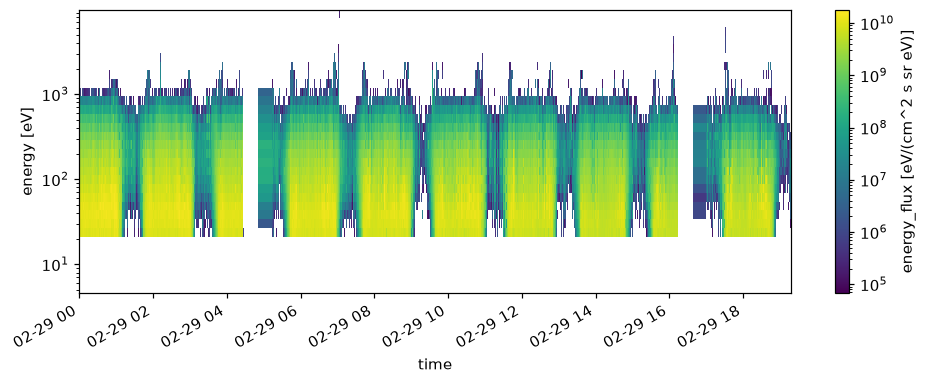
The y axis and the colorbar are logarithmic by default, and the colorbar shows the variable name and units,
such as energy_flux [eV/(cm^2 s sr eV)]. Set the visible range with ylim=(10, 10000), vmin=1e6, and vmax=1e9.
From the second run on, the source file and calibration table are read from the Store without network access.
4. Load as an array
For analysis, load() returns the array.
flux = spn.kaguya.esa1.energy_flux.load(time)
flux.info()          # dimensions, units, and source files
flux.to_xarray()     # xarray.DataArray
flux.files           # source files that were read
The returned SopranArray is an xarray array with units, frame, provenance, and processing history attached.
flux.plot() draws the same figure, and results of sel or mean keep the same type.
5. Save the figure
flux.quicklook("esa1_energy_flux_20080229", root="reports")
This writes a PNG to reports/ together with a JSON record of the time range, panel types, and axis and colorbar labels (with units).
Pass formats=("png", "html") to also write an HTML page that combines the image and the record.
Next
- To see which other variables exist and what you can check before loading, read Exploring Data.
- To repeat analyses with a fixed period and region, read Reproducible Analysis.
- PACE calibration and caveats are described in PACE.